



No results were found for the filter!


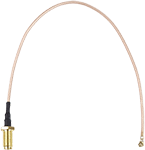
- Anschluss / Stecker: U.FL (IPX) / SMA Buchse
- Betriebstemperatur: -20°C bis +65°C
- Kabellänge: ca. 20 cm
- Betriebstemperatur: -20°C bis +65°C
- Kabellänge: ca. 20 cm
Article no.: 125177

- Anschluss / Stecker: U.FL (IPX) / RP-SMA
- Betriebstemperatur: -20°C bis +65°C
- Kabellänge: ca. 20 cm
- Betriebstemperatur: -20°C bis +65°C
- Kabellänge: ca. 20 cm
Article no.: 8007243

Käfigmuttern-Set zum Einbau von 19" Netzwerk-Geräten in den Schrank. Die Käfigmuttern werden dafür entsprechend der HE des Gerätes in die quadratischen Öffnungen der Rasterschienen geklemmt.
Set mit 20 Stück
Set mit 20 Stück
Article no.: I01950A


RJ45 Modularkupplung/Verbinder, CAT 6A
2x RJ45-Buchse (8P8C)
2x RJ45-Buchse (8P8C)
Article no.: 72499

- Steckverbinder: Buchse
- Steckverbinder-Typ: RJ45
- Anzahl Pole: 8
- Steckverbinder-Ausgangssystem: 8p8c
- Mechanische Montage: auf PCB
- Elektrische Montage: THT
- Räumliche Orientierung: 90°-Winkel
- Steckverbinder-Typ: RJ45
- Anzahl Pole: 8
- Steckverbinder-Ausgangssystem: 8p8c
- Mechanische Montage: auf PCB
- Elektrische Montage: THT
- Räumliche Orientierung: 90°-Winkel
Article no.: RJ45-8P8C-G1

Werkzeugfreier RJ45 Stecker CAT 6 UTP ungeschirmt
für 3 verschiedene Kabel Ø: bis 5,2 / 6,4 / 7,5 mm
für 3 verschiedene Kabel Ø: bis 5,2 / 6,4 / 7,5 mm
Article no.: 44738

- Steckverbinder-Typ: Buchse RJ11 - 4 Pole
- Kategorie Ethernet: Cat 3
- Steckverbinder-Variante: ungeschirmt
- Kontaktbeschichtung: vergoldet
- Steckverbinder-Ausgangssystem: 6p4c
- Sperrsystem: Klemme unten
- Mechanische Montage: auf PCB
- Elektrische Montage: THT
- Räumliche Orientierung: 90°-Winkel
- Mechanische Haltbarkeit: 250 Zyklen
- Kategorie Ethernet: Cat 3
- Steckverbinder-Variante: ungeschirmt
- Kontaktbeschichtung: vergoldet
- Steckverbinder-Ausgangssystem: 6p4c
- Sperrsystem: Klemme unten
- Mechanische Montage: auf PCB
- Elektrische Montage: THT
- Räumliche Orientierung: 90°-Winkel
- Mechanische Haltbarkeit: 250 Zyklen
Article no.: RJ11-6P4C-G1

Werkzeugfreier RJ45 Stecker CAT 5e UTP ungeschirmt
für 3 verschiedene Kabel Ø: bis 5,2 / 6,4 / 7,5 mm
für 3 verschiedene Kabel Ø: bis 5,2 / 6,4 / 7,5 mm
Article no.: 68859

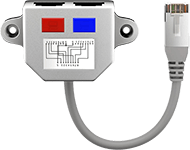
Kabel-Splitter (Netzwerkdoppler), CAT Y-Adapter
Beschaltung: 2x CAT 5 Ethernet, geschirmt
Beschaltung: 2x CAT 5 Ethernet, geschirmt
Article no.: 68908

RJ45 Stecker, CAT 5e STP geschirmt mit Knickschutztülle
für Rundkabel mit Einfädelhilfe
für Rundkabel mit Einfädelhilfe
Article no.: 68749

CAT 6a Unterputzdose (UP), Weiß
2x RJ45 Netzwerkdose, geschirmt
2x RJ45 Netzwerkdose, geschirmt
Article no.: 68721

Article no.: 08-51001

Dieser feldkonfektionierbare Stecker dient zum Anschluss von Netzwerkkabeln, dabei können verschiedene Kabeltypen genutzt werden.
Article no.: 08-45004

RJ45 Modularkupplung/Verbinder, CAT 5e
2x RJ45-Buchse (8P8C)
2x RJ45-Buchse (8P8C)
Article no.: 15027

RJ45 crossover Modular-Adapter, CAT 5e
RJ45-Stecker (8P8C) > RJ45-Buchse (8P8C)
RJ45-Stecker (8P8C) > RJ45-Buchse (8P8C)
Article no.: 68912


Der feldkonfektionierbare Cat.6A Kabelverbinder von LogiLink ermöglicht eine einfache und schnelle Montage vor Ort, egal ob in bestehenden Netzwerken oder zur Erstellung eines neuen Links. Dieser Kabelverbinder lässt sich vor Ort und im Feld ohne spezielles Werkzeug schnell und einfach anschließen. Er ist bestens geeignet für professionelle und industrielle Anwendungen.
Article no.: 4052792049954

Outdoor (IP68) RJ45 Modularkupplung/Verbinder, CAT 6
staub- und wasserdicht, 2x RJ45-Buchse (8P8C)
staub- und wasserdicht, 2x RJ45-Buchse (8P8C)
Article no.: 79566

Netzwerk Verbindungs-/ Anschlussbox CAT 6+, STP
zum Verbinden von zwei Netzwerk-Installationskabeln
zum Verbinden von zwei Netzwerk-Installationskabeln
Article no.: 96101


Bei Patchkabeln tritt häufig das Problem auf, dass die Rastnasen zur Verriegelung in der RJ45 Buchse abbrechen. Mit diesem Clip von Delock können einfach und schnell die beschädigten Netzwerkstecker repariert werden. Der Reparatur Clip wird auf dem Stecker angebracht und dadurch die fehlende Rastnase ersetzt. Durch die Ausführung in verschiedenen Farben können die Kabel gekennzeichnet werden.
Article no.: D86420

Käfigmuttern-Set zum Einbau von 19" Netzwerk-Geräten in den Schrank. Die Käfigmuttern werden dafür entsprechend der HE des Gerätes in die quadratischen Öffnungen der Rasterschienen geklemmt.
Set mit 100 Stück
Set mit 100 Stück
Article no.: I01950C

1-Port RJ45-Anschlussdose, CAT 6, STP
geschirmt
geschirmt
Article no.: 77634

ISDN Adapter
RJ45-Buchse (8P8C) > RJ45-Buchse (8P8C)
RJ45-Buchse (8P8C) > RJ45-Buchse (8P8C)
Article no.: 50260

2-port RJ45 Anschlussdose, CAT 6, STP
geschirmt
geschirmt
Article no.: 77635

CAT 6a Universaldose inkl. Aufputzmontage-Rahmen
Weiß 2x RJ45 Netzwerkdose, geschirmt
Weiß 2x RJ45 Netzwerkdose, geschirmt
Article no.: 68572

Dieser feldkonfektionierbare Stecker dient zum Anschluss von Netzwerkkabeln, dabei können verschiedene Kabeltypen genutzt werden.
Article no.: 08-45001

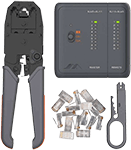
Werkzeugset für Telefon- und Netzwerkinstallation
zur Installation und Überprüfung des Heimnetzwerkes
zur Installation und Überprüfung des Heimnetzwerkes
Article no.: 97790

Bei Patchkabeln tritt häufig das Problem auf, dass die Rastnasen zur Verriegelung in der RJ45 Buchse abbrechen. Mit diesem Clip von Delock können einfach und schnell die beschädigten Netzwerkstecker repariert werden. Der Reparatur Clip wird auf dem Stecker angebracht und dadurch die fehlende Rastnase ersetzt. Durch die Ausführung in verschiedenen Farben können die Kabel gekennzeichnet werden.
Article no.: D86422

RJ45 Fensterdurchführung Ultra-Slim
zum Verlegen von Netzwerkverbindungen zwischen Fensterrahmen
zum Verlegen von Netzwerkverbindungen zwischen Fensterrahmen
Article no.: 71411

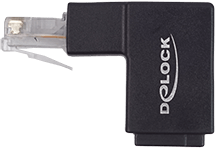
Mit diesem Adapter von Delock kann die RJ45 Buchse eines Gerätes um 90° abgewinkelt werden. Dies erleichtert den Anschluss eines Netzwerkkabels an schwer zugänglichen Stellen.
Article no.: D86424

Dieser RJ45 Umschalter von Delock ist ein manueller bidirektionaler Umschalter zur Verbindung verschiedener Geräte mit RJ45 Anschluss, der zwei verschiedene Einsatzmöglichkeiten bietet.
1. Zwei Geräte mit RJ45 Anschluss können abwechselnd an ein Netzwerk angeschlossen werden.
2. Ein Gerät mit RJ45 Anschluss kann abwechselnd an zwei Netzwerke angeschlossen werden.
1. Zwei Geräte mit RJ45 Anschluss können abwechselnd an ein Netzwerk angeschlossen werden.
2. Ein Gerät mit RJ45 Anschluss kann abwechselnd an zwei Netzwerke angeschlossen werden.
Article no.: D87673

Dieser RJ45 Stecker von Delock kann zum Anschluss von Netzwerkkabeln verwendet werden. Der Stecker lässt sich werkzeugfrei und zeitsparend an verschiedene Kabeltypen montieren.
Article no.: D86287

Netzwerk Verbindungs-/ Anschlussbox CAT 5e (100MHz), STP
zum Verbinden von zwei Netzwerk-Installationskabeln
zum Verbinden von zwei Netzwerk-Installationskabeln
Article no.: 50481

RJ45 Modularkupplung/Verbinder mit Montageflansch, CAT 6
2x RJ45-Buchse (8P8C)
2x RJ45-Buchse (8P8C)
Article no.: 81365

Eurobuchse (Typ C, CEE 7/16) > RJ45-Stecker (8P8C)
abnehmbare Schraubbefestigung, 2-teilig
abnehmbare Schraubbefestigung, 2-teilig
Article no.: 76736

- Kabeltester zum Testen Ihrer Netzwerk und USB Kabel
- Zum Testen von RJ11/ RJ12/ RJ45 und USB Kabeln
- automatisches Kabel Testen mit Auto-Scan
- Zum Testen von RJ11/ RJ12/ RJ45 und USB Kabeln
- automatisches Kabel Testen mit Auto-Scan
Article no.: M726AT

werkzeugloser Kabel Verbinder ''slim'' CAT 6A, STP geschirmt
zum Verbinden von zwei Netzwerk-Installationskabeln
zum Verbinden von zwei Netzwerk-Installationskabeln
Article no.: 79579
Viewed